 Clip
Clip
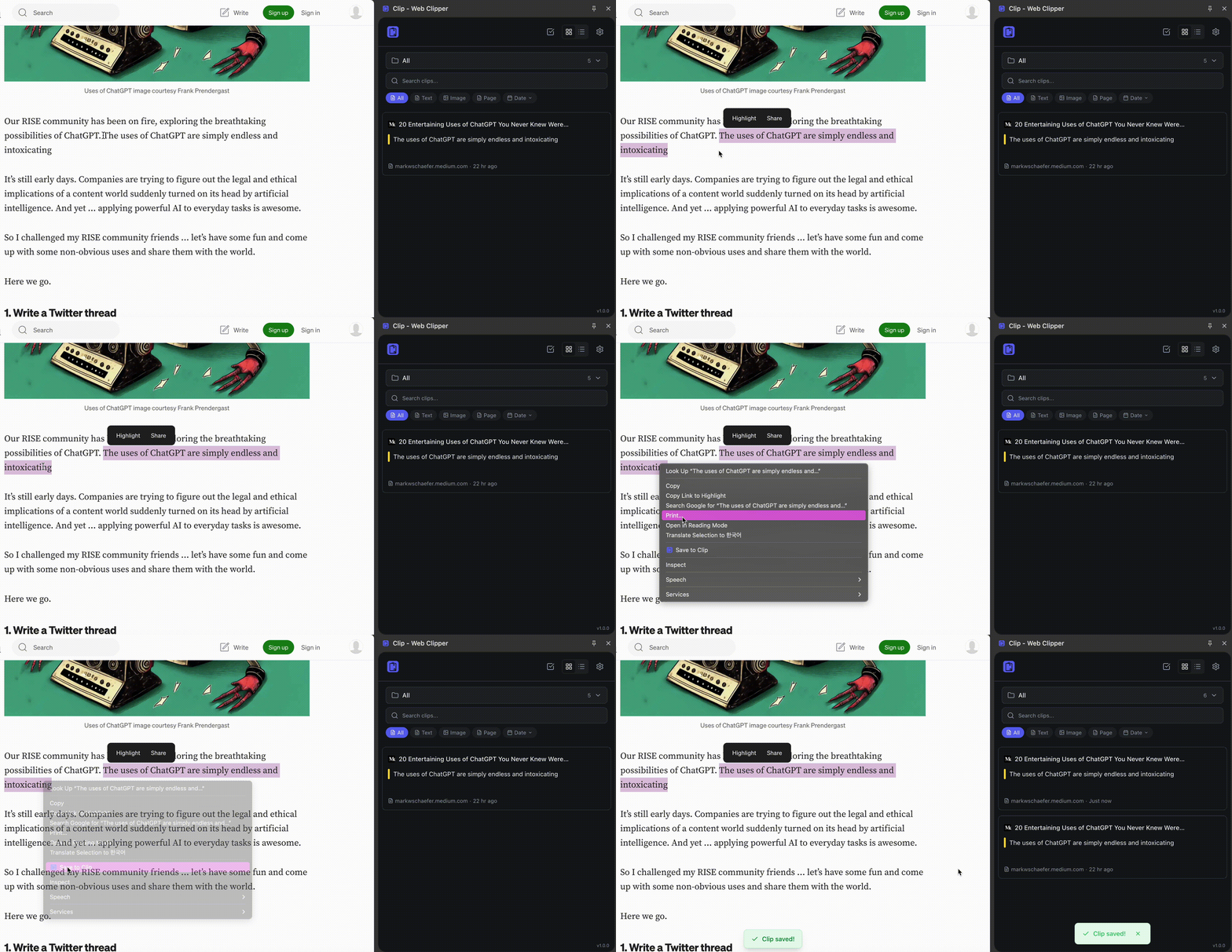
Save anything from the web to YOUR Google Drive
Select → Right-click → Done.
No servers. No subscriptions. Just your Drive.
Why Clip?
What happens to your clips when Pocket shuts down?
They store your data on their servers. We don't.
With Clip, everything goes directly to YOUR Google Drive.
If we disappear tomorrow, your data stays yours—forever.
We can't see your clips
No servers. Your data lives in your browser and your Google Drive. That's it.
Switch devices, keep everything
ProAuto-backup to Google Drive. Reinstall your browser, change your laptop—your clips stay safe.
3 seconds. Done.
Select, right-click, save. No app to open. No folders to organize. Just clip and go.
Find anything instantly
Full-text search across all your clips. Filter by tags, dates, or type.
Pay once, own it forever
$29. No subscriptions. All future updates included.
Highlight & Tag
Add color highlights. Tag for easy lookup. Stay organized without effort.
| Feature | Clip | Raindrop | |
|---|---|---|---|
| No servers | |||
| Lifetime license | |||
| Google Drive backup | Pro | Partial | |
| Free plan | Unlimited | Limited | Limited |
Simple pricing. No surprises.
Pay once, use forever. No subscriptions.
Free
Everything you need to get started
- Unlimited clips
- Text, image & page clipping
- Instant search
- Dark mode
- Tags & highlights
- Manual Google Drive backup
Pro
For power users who want it all
- Everything in Free
- Auto Google Drive backup
- Organize clips in folders
- Bulk edit & delete
- Priority support
- All future updates
Frequently Asked Questions
Got questions? We've got answers.
How is this different from Pocket or Raindrop?
They store your data on their servers. We don't have servers. Everything goes directly to your Google Drive. If we shut down tomorrow, your data stays yours.
Do you really have no servers?
Really. Clip runs 100% in your browser. Your clips are stored locally and backed up to your Google Drive only. We literally cannot access your data.
How does Google Drive backup work?
We use Chrome's official OAuth to access a dedicated app folder in your Drive. Only Clip can read this folder. Your backups are encrypted.
What's the difference between Free and Pro?
Free gives you unlimited clips, search, and manual backup. Pro adds auto-backup, folder organization, and bulk editing. Pro is a lifetime license—pay once, use forever.
What's included in the lifetime license?
One payment, forever access. No recurring fees. All future updates included. Use it on multiple devices with one account.
What browsers are supported?
Chrome and Chromium-based browsers (Edge, Brave, Arc). Firefox and Safari support coming soon.
Can I export my data?
Yes. Export all clips to JSON anytime. Your data is always yours.
What's your refund policy?
30-day money-back guarantee. Not happy? Full refund. No questions asked.